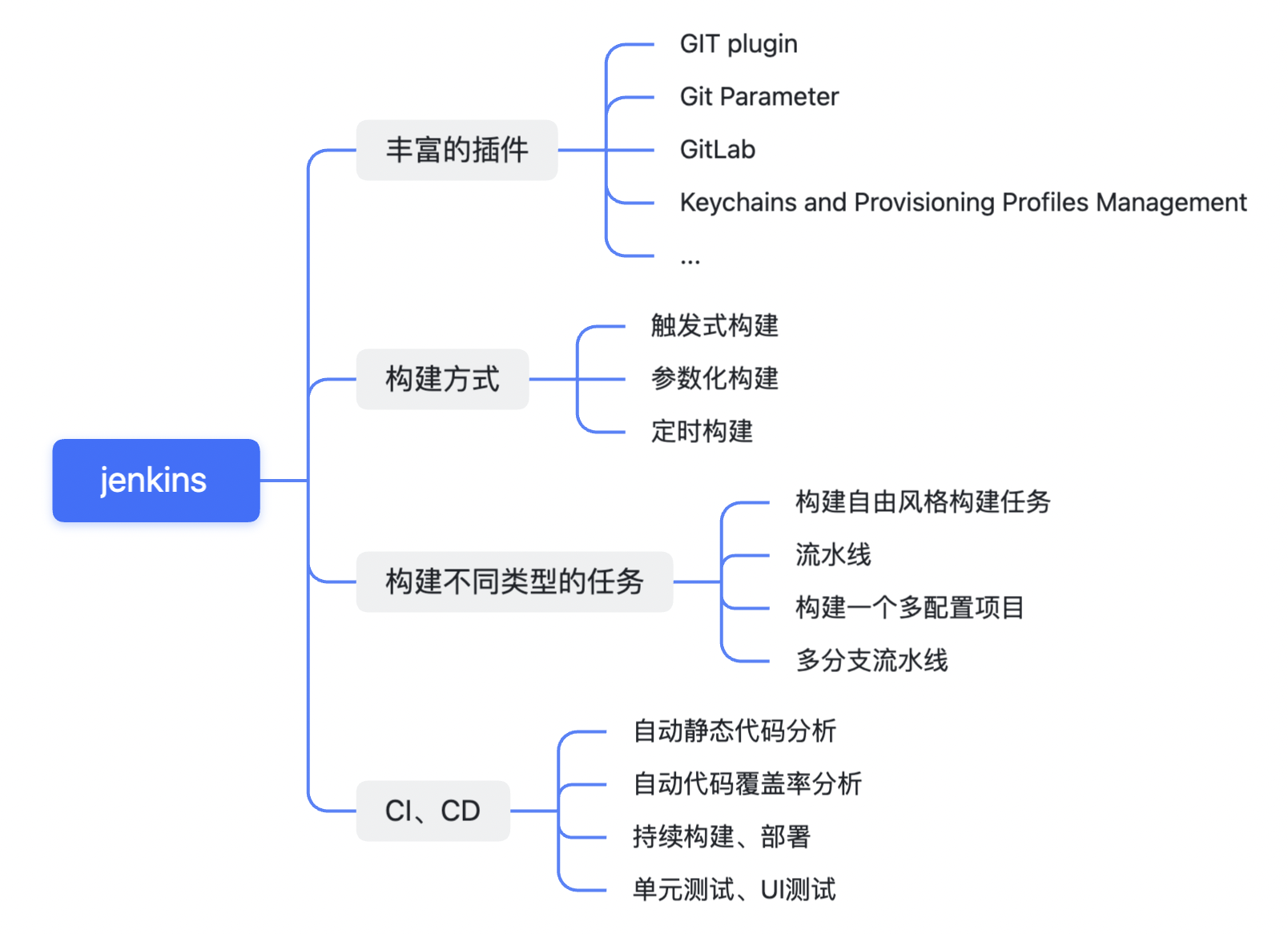
现状 每次出包需要做的事情:缓存代码、切分支、xcode打包、阻塞开发、手动导出、手动上传、手动通知、
持续集成: 构建方式:
xcodebuild 由 Apple 开发,主要用于 Xcode
fastlane 实际上并不是一个工具,而是一组可用于构建、测试、上传至iTunes Connect、供应配置文件管理、屏幕截图创建、dsym 上传 / 下载至主要崩溃报告平台的一系列工具。
xctool和其他 “其他”是指诸如 nomad tools 等工具,这些工具或者被弃用,或者逐渐缺少支持,或者即将被废弃。尽管 Facebook在使用某种工具,但并不意味着这个工具依然可以得到妥善的维护。
服务器:
TravisCI/CircleCI 托管式服务器,可免费用于开源项目,可随处访问,极为强大。相比 Jenkins 可配置的选项较少,仅支持与 Github 集成。用于私有代码库的价格高昂。Xcode Server 能与 Xcode 高度集成,实际上也是唯一可用于 Xcode 的服务器,由 Apple 开发,无法与 Gitlab/Bitbucket/Github 集成,仅适用于本地运行单元测试和真机测试。Jenkins CI 服务器领域曾经的王者,有大量插件可用,可与各种其他产品集成,需要一定的配置和维护,但是非常强大,免费且强大。其它:自己实现服务器(如阿里摩天轮)
选型:TravisCI/CircleCI仅支持与github集成,Xcode Server无法与 Gitlab/Bitbucket/Github 集成,这里使用Jenkins
jenkins简介 简介 Jenkins是一个可扩展的持续集成引擎
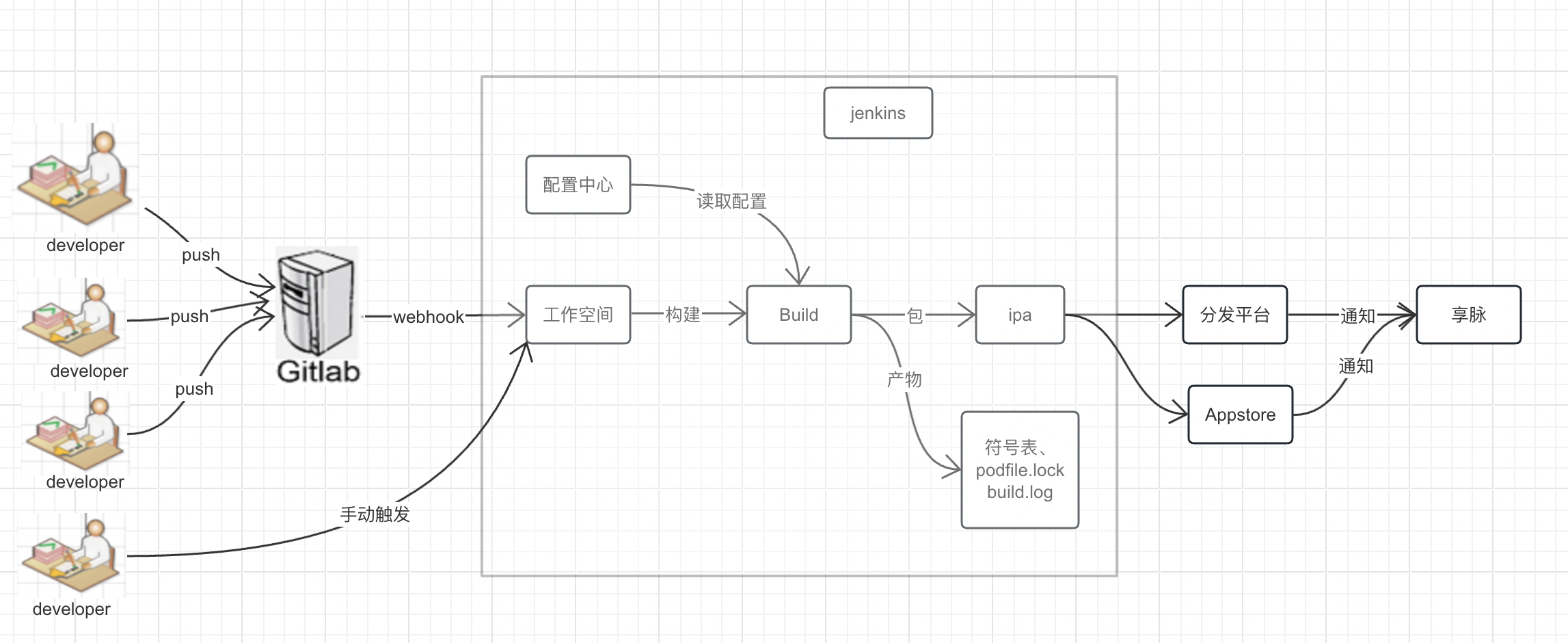
工作流程
jenkins安装配置 安装 略
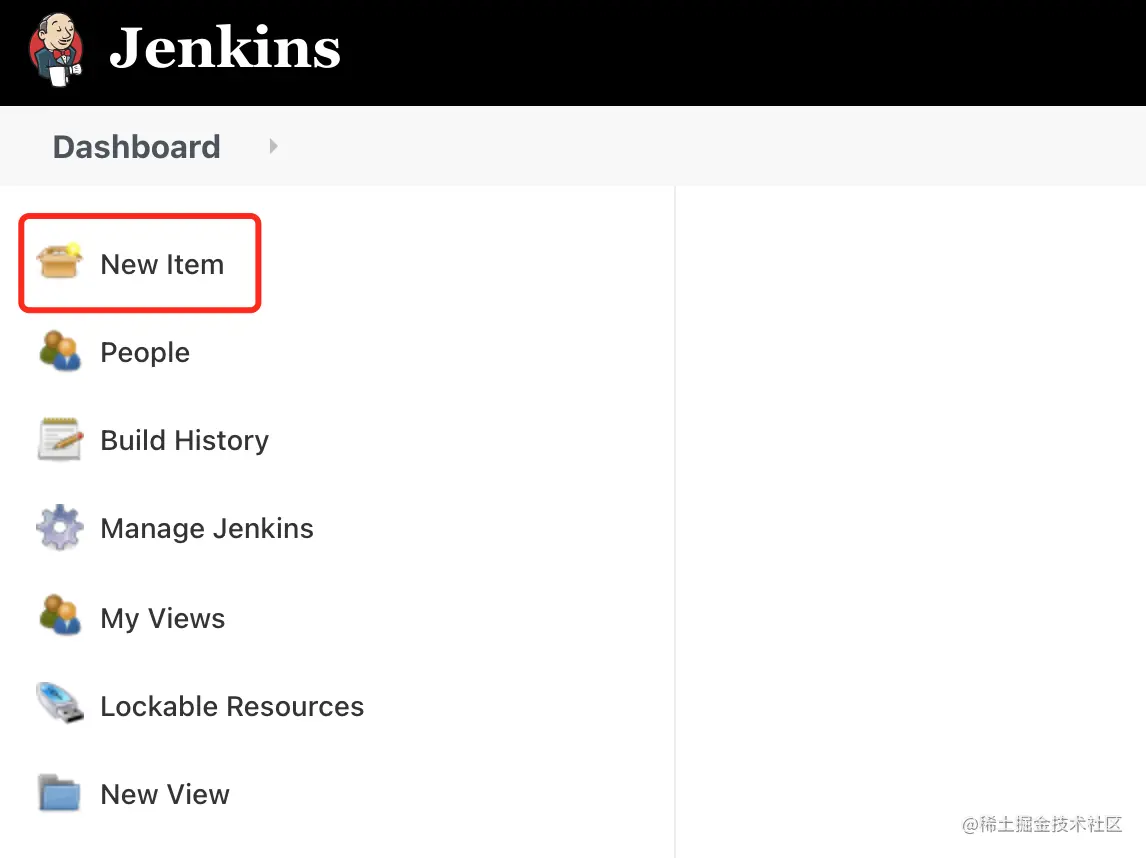
创建任务 点击 Jenkins 首页的 New Item 进行创建新的项目:
项目类型 输入项目名称 item name,选择 Freestyle project,然后点击 OK:
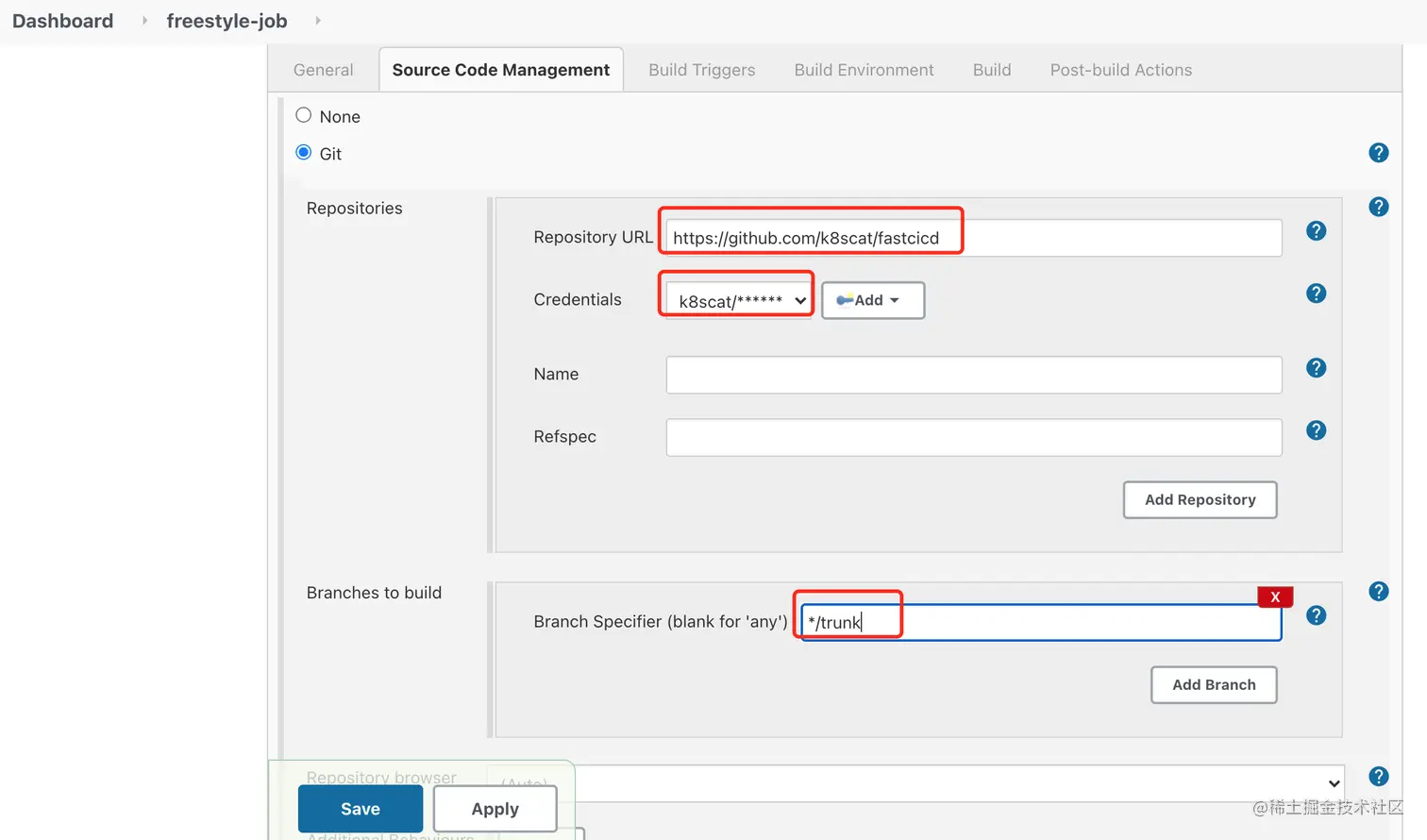
项目配置 配置 SCM 通常,我们会使用 Git 版本控制工具管理我们的代码,这里我们选择使用 GitHub,包括填写代码仓链接 Repository URL、凭据 Credentials 和 构建分支 Branches to build:
GitHub repo: github.com/k8scat/fast…
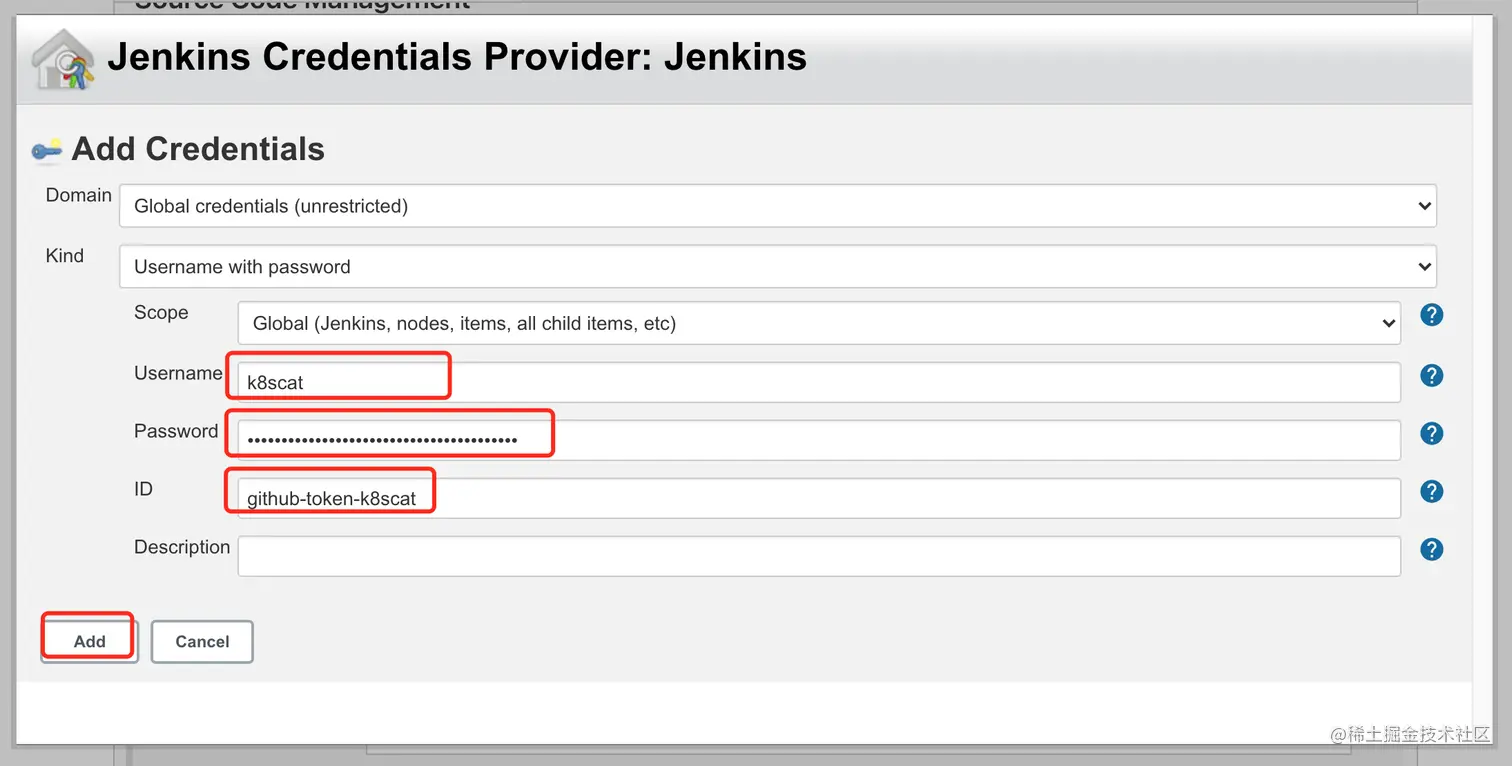
添加凭据 Jenkins 拥有管理各种凭据的能力,包括 Username with password、GitHub App、SSH Username with private key、Secret file、Secret text 和 Certificate。
这里我们将用到其中一种,那就是 Username with password:
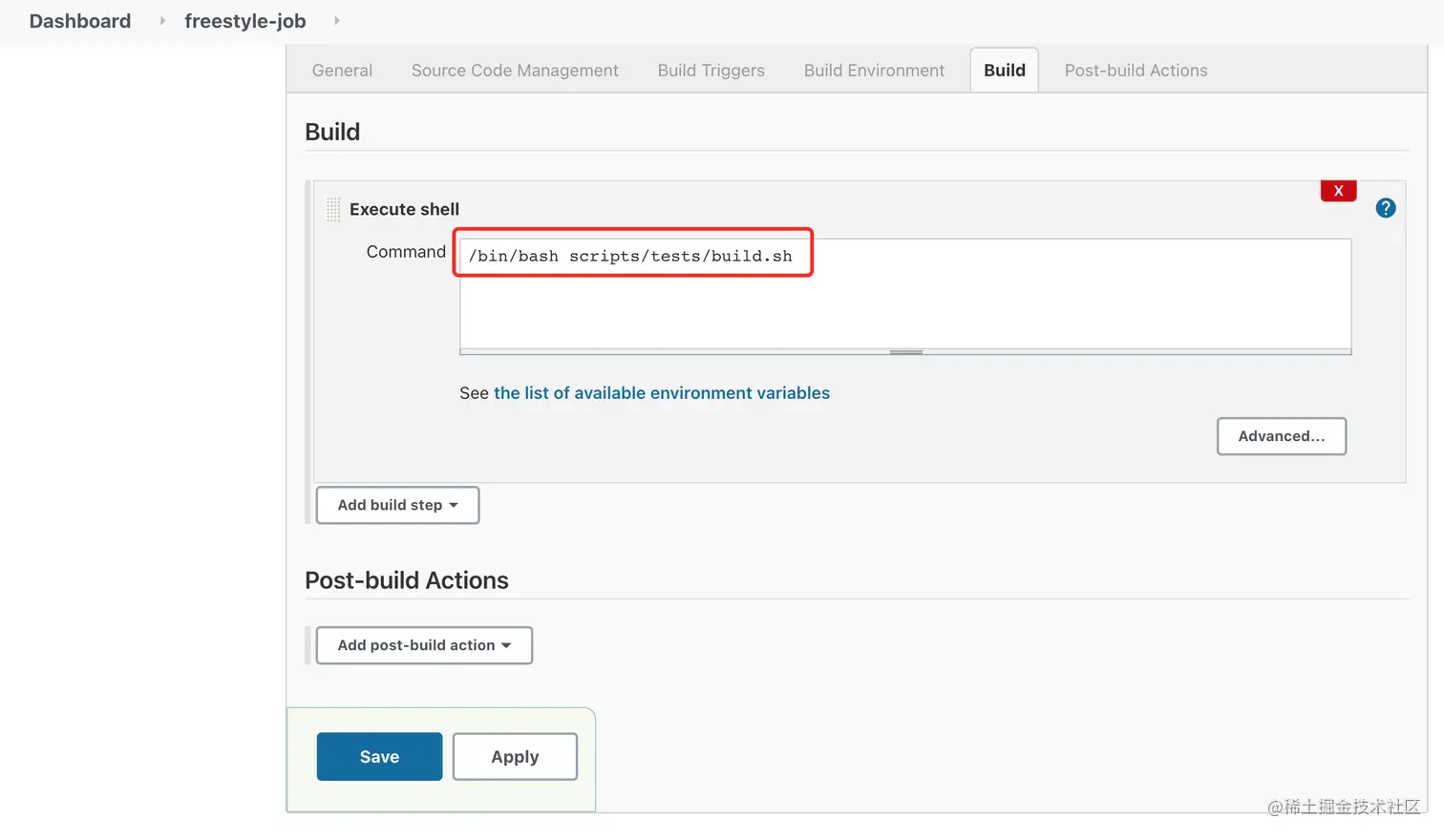
构建步骤 Jenkins 支持多种类型的构建步骤,包括 Execute Windows batch command、Execute shell、Invoke Ant、Invoke Gradle script、Invoke top-level Maven targets、Run with timeout 和 Set build status to "pending" on GitHub commit。
这里我们会使用到 Execute shell 类型的构建步骤:
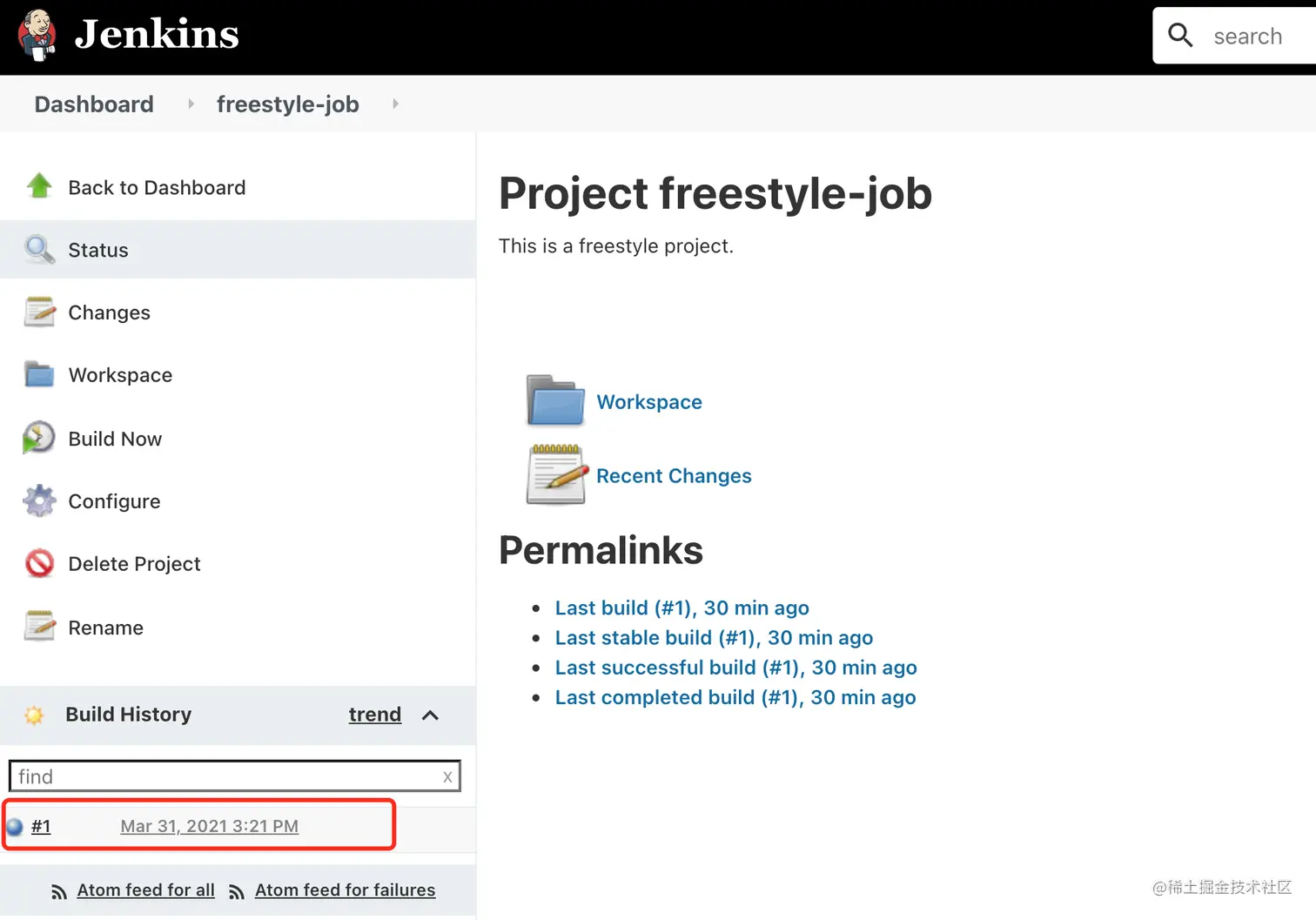
立即构建 Save 保存后,我们可以回到 Job 的页面,然后点击 Build Now 立即进行构建:
构建历史 构建完成后,我们可以看到对应的构建历史:
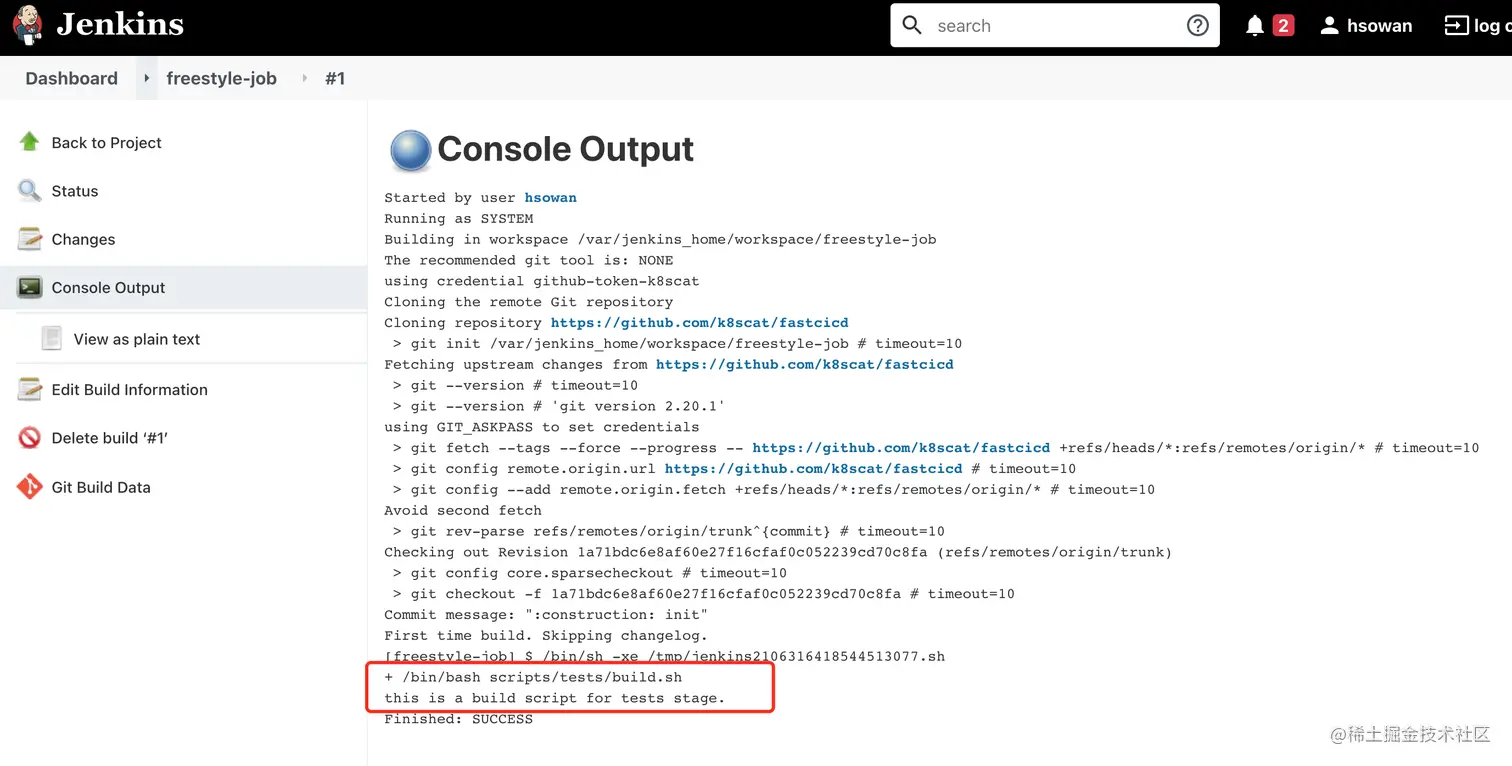
控制台日志 找到最新的构建历史,我们可以进去查看构建的控制台输出,这里会打印构建过程中的输出内容,以及最后的 SUCCESS 表明我们的构建结果是成功的:
构建脚本 构建的脚本及导出依赖的配置文件都放在项目的根目录下
1
2
3
4
5
6
7
8
9
10
11
12
13
14
15
16
17
18
19
20
21
22
23
24
25
26
27
28
29
30
31
32
33
34
35
36
37
38
39
40
41
42
43
44
45
46
47
48
49
50
51
52
53
54
55
56
57
58
59
60
61
62
63
64
65
66
67
68
69
70
71
72
73
74
75
76
77
78
79
80
81
82
83
84
85
86
87
88
89
90
91
92
93
94
95
96
97
98
99
100
101
102
103
104
105
106
107
108
109
110
111
112
113
114
115
116
117
118
119
# #!/bin/sh # 计时 SECONDS=0 #打包类型 BUILD_TYPE=${Build_Config} # 工程名 APP_NAME="ios_chat" # workspace名 WORK_SPACE="ios_chat.xcworkspace" #info.plist路径 project_infoplist_path="./${APP_NAME}/Info.plist" #取版本号 #bundleShortVersion=$(/usr/libexec/PlistBuddy -c "print CFBundleShortVersionString" "${project_infoplist_path}") bundleShortVersion=`xcodebuild -showBuildSettings | grep MARKETING_VERSION | tr -d 'MARKETING_VERSION ='` bundleVersion=`xcodebuild -showBuildSettings -target ${APP_NAME} | grep CURRENT_PROJECT_VERSION | tr -d 'CURRENT_PROJECT_VERSION = '` old_build_version=$bundleVersion echo "old_build_version = $old_build_version" #版本号 agvtool new-version ${BUILD_NUMBER} #时间 BUILD_START_DATE="$(date +'%Y-%m-%d_%H:%M')" DATE="$(date +%Y%m%d)" # IPA路径 # IPAPATH="${APP_NAME}_${BUILD_TYPE}_V${bundleShortVersion}_B${bundleVersion}_${DATE}" IPAPATH="./jenkinsBuild/${BUILD_NUMBER}" # xcarchive XCARCHIVE="${IPAPATH}/${APP_NAME}_${BUILD_TYPE}_V${bundleShortVersion}_B${bundleVersion}_${DATE}.xcarchive" #IPA输入路径 IPAPATHOUT="${IPAPATH}/${APP_NAME}.ipa" if [ "$BUILD_TYPE" = "Release" ] ; then ExportOptionsPlistPath="./ExportSettings/DevelopmentExportOptionsPlist.plist" elif [ "$BUILD_TYPE" = "AppStore" ] ; then ExportOptionsPlistPath="./ExportSettings/AppStoreExportOptionsPlist.plist" elif [ "$BUILD_TYPE" = "Debug" ] ; then ExportOptionsPlistPath="./ExportSettings/DevelopmentExportOptionsPlist.plist" else echo "输入的参数无效!!!" exit 1 fi echo "\n\n\033[32m -----------------------Xcode打包-----------------------\033[0m\n\n\n" # 清理 echo "\n\n\033[32m +++++++++++++++++清理中+++++++++++++++++\033[0m\n\n\n" xcodebuild -workspace "${WORK_SPACE}" -scheme "${APP_NAME}" -configuration "${BUILD_TYPE}" clean # 编译 echo "\n\n\033[32m +++++++++++++++++编译中+++++++++++++++++\033[0m\n\n\n" xcodebuild -workspace "${WORK_SPACE}" -sdk iphoneos -scheme "${APP_NAME}" -archivePath "./${XCARCHIVE}" -configuration "${BUILD_TYPE}" archive -allowProvisioningUpdates # 打包 echo "\n\n\033[32m +++++++++++++++++打包中++++++++++++++++++\033[0m\n\n\n" xcodebuild -exportArchive -archivePath "${XCARCHIVE}" -exportPath "${IPAPATH}" -exportOptionsPlist ${ExportOptionsPlistPath} -allowProvisioningUpdates # 输出打包总用时 echo "\033[36;1m使用BuildScript打包总用时: ${SECONDS}s \033[0m" echo "\n\n\033[32m -----------------------上传到蒲公英-----------------------\033[0m\n\n\n" #蒲公英上的user Key uKey="0fed093db25e555b854a40ae7ce3eb5f" #蒲公英上的API Key apiKey="5c9a5739bd06aa5941af24b2e510a687" # #蒲公英版本更新描述,这里取git最后一条提交记录作为描述 MSG=`git log -1 --pretty=%B` #要上传的ipa文件路径 echo $IPAPATHOUT # 执行上传至蒲公英的命令 echo "++++++++++++++upload+++++++++++++" curl -F "file=@${IPAPATHOUT}" -F "uKey=${uKey}" -F "_api_key=${apiKey}" -F "buildUpdateDescription=${MSG}" http://www.pgyer.com/apiv2/app/upload > uploadResponse.json # cat uploadResponse.json echo "++++++++++++++提取上传响应信息+++++++++++++" uploadResult=`cat $WORKSPACE/uploadResponse.json` url1=`echo "${uploadResult##*"buildQRCodeURL"}"` urlLength=`expr ${#url1} - 6` url2=`echo ${url1:3:$urlLength}` buildQRCodeURL=`echo $url2 | sed 's:\\\/:\/:g'` if [ ! $buildQRCodeURL ]; then echo "~~~~~~~~~~~~~~~~~~~上传失败~~~~~~~~~~~~~~~~~~~" exit else echo "~~~~~~~~~~~~~~~~~~~上传成功~~~~~~~~~~~~~~~~~~~" echo "构建版本:${bundleShortVersion}" echo "二维码链接:${buildQRCodeURL}" fi echo "buildQRCodeURL=${buildQRCodeURL}\r\nbuildVersion=${bundleShortVersion}">> uploadResult.txt echo "\n\n\033[32m -----------------------上传群通知-----------------------\033[0m\n\n\n" curl -X POST -H "Content-Type: application/json" -d '{"content":"###iOS包构建成功 \n构建类型:'${BUILD_TYPE}' \n 构建版本:'${bundleShortVersion}'_'${BUILD_NUMBER}' \n 构建分支:'${BRANCH_NAME}' \n 下载地址:'${buildQRCodeURL}' \n 构建时间:'${BUILD_START_DATE}'"}' https://improd.sharexm.com/api/admin/send/msg
遇到的问题 1、 pod: command not found这个情况一般是由于 jenkins 没有设置正确的PATH环境变量导致. 执行
PATH,记录下输出的结果
在 key 中填写 PATH,在 value 中填写第一步中输出的结果保存即可.
1
2
3
4
5
6
7
sudo vi ~/.bash_profile //插入 export PATH=/xxxxxxxx(ruby绝对路径)/bin: $PATH//(/Users/edy/.rvm/rubies/ruby-3.0.0/bin:$ PATH) export PATH=/bin:/usr/bin:usr/sbin:usr/local/bin:$PATH //(系统环境有错的也可以修复 本质就是让shell在运行的之后可以去指定路径寻找可执行文件) //按一下esc 再按shift+z+z 保存退出
terminal 中输入 source ~/.bash_profile 回车刷新配置文件即可
2、Unicode Normalization not appropriate for ASCII-8BIT 在终端顶部输入
1
2
3
export LANG=en_US.UTF-8 export LANGUAGE=en_US.UTF-8 export LC_ALL=en_US.UTF-8
3、shell获取MARKETING_VERSION失败问题 老版本(从info.plist读取):
1 bundleShortVersion=$(/usr/libexec/PlistBuddy -c "print CFBundleShortVersionString" "${project_infoplist_path}")
Xcode11之后(在.proj里):
1 bundleShortVersion=xcodebuild -showBuildSettings | grep MARKETING_VERSION | tr -d 'MARKETING_VERSION ='
4、局域网无法通过ip访问 jenkins搭建好之后通过http://localhost:8080 , 但是通过ip无法访问
解决方案:
进入jenkins管理页面,系统管理 =》system =》 Jenkins Location,将`Jenkins URL` 设置为本地ip地址 ,查看Jenkins进程,ps -ef|grep jenkins,结果如下:
可以看到,jenkins默认的httpListenAddress是127.0.0.1也就是本机地址,如果局域网需要访问的话需要改成0.0.0.0,修改httpPort的值就是修改端口
1 /opt/homebrew/opt/jenkins-lts/libexec/jenkins.war --httpListenAddress=127.0.0.1 --httpPort=8080
按照上面给的路径进入到`/opt/homebrew/opt/jenkins-lts/libexec/`, 找到配置文件`homebrew.mxcl.jenkins-lts.plist`, 将里面的`--httpListenAddress=127.0.0.1`改成`--httpListenAddress=0.0.0.0`, 重启后再次访问就可以了
注意:home brew 安装的启动命令是(因为我安装的是jenkins-lts, 如果是jenkins, 将jenkins-lts换成jenkins即可)
1
2
3
4
Install the latest LTS version: brew install jenkins-lts Start the Jenkins service: brew services start jenkins-lts Restart the Jenkins service: brew services restart jenkins-lts Update the Jenkins version: brew upgrade jenkins-lts
如果还是不行, 试试将~/Library/LaunchAgents/homebrew.mxcl.jenkins.plist的ListenAddress也改为本机ip或者0.0.0.0
5、curl 解析shell脚本里的变量失败问题 1 2 3 4 5 //json 中变量不能解析(我出错的) '{"password":"$adm_pass"}' //json 中变量能解析(执行成功的) '{"password":"'$adm_pass'"}'
最终上传到分发平台的脚本
1 curl -X POST -H "Content-Type: application/json" -d '{"content":"###iOS包构建成功 \n构建类型:'${BUILD_TYPE}' \n 构建版本:'${bundleShortVersion}'_'${new_build_version}' \n 构建分支:'${BRANCH_NAME}' \n 下载地址:'${buildQRCodeURL}' \n 构建时间:'${BUILD_START_DATE}'"}' https://improd.sharexm.com/api/admin/send/msg
6、写包版本号问题 Xcode11之前是通过info.plist
xcode11之后:
#设定值版本号`agvtool new-version 123`
整体进度:
参考: Xcodeproj https://www.jenkins.io/ xctool https://juejin.cn/post/6945090740670169096?searchId=202402291054491FD5A84573E3A9CE05B6 https://juejin.cn/post/6945847290833666078